GPUs in Kubernetes: Practical Guide for H100, MIG & Time-Slicing
How to securely, efficiently, and cloud-natively provision GPU resources for development, inference, and training - including H100-MIG and Time-Slicing, YAML examples, and operational policies.
TL;DR
- Yes, a single GPU can be used by multiple Pods – either hardware-isolated via MIG (Multi-Instance GPU) or cooperatively via Time-Slicing.
- Developers request exactly the GPU size they need (e.g.,
nvidia.com/mig-3g.40gb: 1), receive predictable performance, and only pay/consume what they use. - Cloud-native patterns (GitOps, CI/CD, IaC, Rolling/Blue-Green, Canary, Autoscaling, Multi-Tenancy) work even for GPU workloads – if the infrastructure is cleanly modeled.
This post shows end-to-end how to operate bare-metal Kubernetes (e.g., with NVIDIA H100) in a production-ready manner, how to effectively combine MIG and Time-Slicing, and which operational and governance aspects (quotas, labeling, monitoring, cost control) are crucial.
Why GPUs in Kubernetes? Three very pragmatic reasons
- Utilization & Cost Control: Traditionally "one GPU per job" is wasteful. Many inference and dev workloads don't require a full H100. Slicing allows for fine-grained distribution of the expensive resource – without the usual zoo of special provisioners.
- Production Readiness & Governance: Kubernetes brings isolation, namespaces, quotas, RBAC, audit. This makes multi-tenant environments manageable – including showback/chargeback, compliance, and reproducible deployments.
- Developer Velocity: The same cloud-native patterns (Helm/Kustomize, GitOps, Progressive Delivery, Self-Service Portals) apply to GPU workloads. Teams deploy faster and more standardized, instead of reinventing infrastructure every time.
In short: Lower CAPEX/OPEX, increased productivity, controlled risk. No rocket science – just clean architecture.
Architecture Overview: H100 on Bare-Metal Kubernetes
A typical stack looks like this:
- Bare-Metal Nodes with NVIDIA H100 (SXM or PCIe), container runtime (Containerd), current NVIDIA driver.
- Kubernetes (>= 1.26 recommended), NVIDIA GPU Operator or dedicated installation of Device Plugin/DCGM (depending on operational philosophy).
- NVIDIA K8s Device Plugin enables detection and scheduling of GPUs or MIG instances.
- DCGM/Exporter provides metrics (Prometheus/Grafana).
- GitOps/CI/CD manages the YAMLs for MIG layouts, device plugin settings, quotas, and workloads.
The central decision: MIG (hard isolation, fixed profiles) vs. Time-Slicing (cooperative sharing, very flexible) – or both, but cleanly separated per node.
Option A: MIG (Multi-Instance GPU) – Hard Isolation & Predictable Performance
MIG divides an H100 hardware-wise into isolated instances. Each instance receives a dedicated share of compute, L2 cache, HBM. Result: stable latency and no interference between tenants.
Supported Profiles (Examples for H100)
- 7 instances:
1g.10gb(each 10 GB) - 4 instances:
1g.20gbor2g.20gb - 3 instances:
3g.40gb - 2 instances:
4g.40gb - 1 instance:
7g.80gb(full GPU)
Rule of thumb: Performance scales roughly proportionally to the instance size. A
3g.40gbdelivers about 3/7 of the computing power of a full H100 (without the typical interference artifacts of soft-sharing).
Setup: Enable MIG on the Nodes
# Enable MIG mode

nvidia-smi -mig 1

# Create MIG instances (Example: 3x 3g.40gb)
nvidia-smi mig -cgi 9,9,9 -C

# Display available profiles

nvidia-smi mig -lgip
Practical Tips
- Per node a consistent MIG layout – facilitates scheduling and prevents "Tetris moments".
- Manage MIG layouts declaratively (IaC/GitOps), not manually via run-book.
- No mixing of MIG and Time-Slicing on the same physical GPU device. Separate per node (label/taints).
Kubernetes Integration: NVIDIA Device Plugin
The device plugin makes MIG profiles visible as discrete resources in the scheduler.
apiVersion: apps/v1
kind: DaemonSet
metadata:
  name: nvidia-device-plugin-daemonset
  namespace: kube-system
spec:
  selector:
    matchLabels:
      name: nvidia-device-plugin-ds
  template:
    spec:
      containers:
      - image: nvcr.io/nvidia/k8s-device-plugin:v0.14.0
        name: nvidia-device-plugin-ctr
        env:
        - name: MIG_STRATEGY
          value: "single"  # or "mixed"
        securityContext:
          allowPrivilegeEscalation: false
          capabilities:
            drop: ["ALL"]
        volumeMounts:
        - name: device-plugin
          mountPath: /var/lib/kubelet/device-plugins
Important
MIG_STRATEGY=single: Scheduler matches Pods against specific MIG profiles (nvidia.com/mig-3g.40gb).MIG_STRATEGY=mixed: More flexibility, but requires conscious resource definition and matching logic in the workloads.
Pods Requesting MIG Instances
apiVersion: v1
kind: Pod
metadata:
  name: gpu-pod
spec:
  containers:
  - name: cuda-container
    image: nvcr.io/nvidia/cuda:12.0-base
    resources:
      limits:
        nvidia.com/mig-3g.40gb: 1  # Requests a 3g.40gb MIG instance
It's that simple for developers: one line in resources.limits determines the size of the GPU slice.
When MIG is the Right Choice
- Multi-Tenant with strict isolation (security, predictable QoS).
- Inference (low, stable latencies; high throughput, predictable).
- Development/Testing (small slices, cost-effective usage).
- Workloads with predictable GPU demand.
Not optimal: Large-model training with strong GPU-to-GPU communication (NCCL, P2P). Here, a full GPU per Pod is more sensible – or multiple full GPUs per node/job.
Option B: Time-Slicing – Maximum Utilization with Cooperative Sharing
Time-Slicing divides a GPU into time slots among multiple Pods. This increases utilization for workloads that do not constantly utilize the GPU (e.g., development notebooks, sporadic inference, pre-/post-processing).
Configuration via ConfigMap
apiVersion: v1
kind: ConfigMap
metadata:
  name: gpu-sharing-config
  namespace: kube-system
data:
  config.yaml: |
    version: v1
    sharing:
      timeSlicing:
        resources:
        - name: nvidia.com/gpu
          replicas: 4  # Divides each GPU into 4 slots
Start Device Plugin with Time-Slicing
- env:
  - name: CONFIG_FILE
    value: /etc/kubernetes/gpu-sharing-config/config.yaml
  volumeMounts:
  - name: gpu-sharing-config
    mountPath: /etc/kubernetes/gpu-sharing-config
When Time-Slicing is Sensible
- Burst workloads (short-lived, "spiky").
- Development environments and notebooks.
- When MIG profiles are too coarse or would need to change frequently.
Trade-offs
- No hard isolation like MIG (resource interference possible).
- Performance is load-dependent (peers have influence). For SLO-critical inference, prefer MIG.
Scheduling & Node Design: Clean Separation, Simple Thinking
Consistency beats micro-tuning. Plan your fleet in clear node roles:
**gpu-mig**: Nodes with active MIG and fixed profile layout (e.g., 3×3g.40gb).**gpu-full**: Nodes with full GPUs (no MIG, no Time-Slicing) for training/HPC.**gpu-ts**: Nodes with Time-Slicing.
Labeling & Affinity
kubectl label nodes gpu-node-1 gpu-type=h100-mig
kubectl label nodes gpu-node-2 gpu-type=h100-full
kubectl label nodes gpu-node-3 gpu-type=h100-ts
Workloads set node affinity or use separate node pools. Result: predictable scheduling, no side effects.
Quotas & Fair Use
apiVersion: v1
kind: ResourceQuota
metadata:
  name: gpu-quota
  namespace: team-a
spec:
  hard:
    nvidia.com/mig-3g.40gb: "6"
This prevents a team from "accidentally" occupying the entire cluster. In shared environments, also set LimitRanges and DefaultRequests.
Monitoring & Observability: DCGM as Foundation
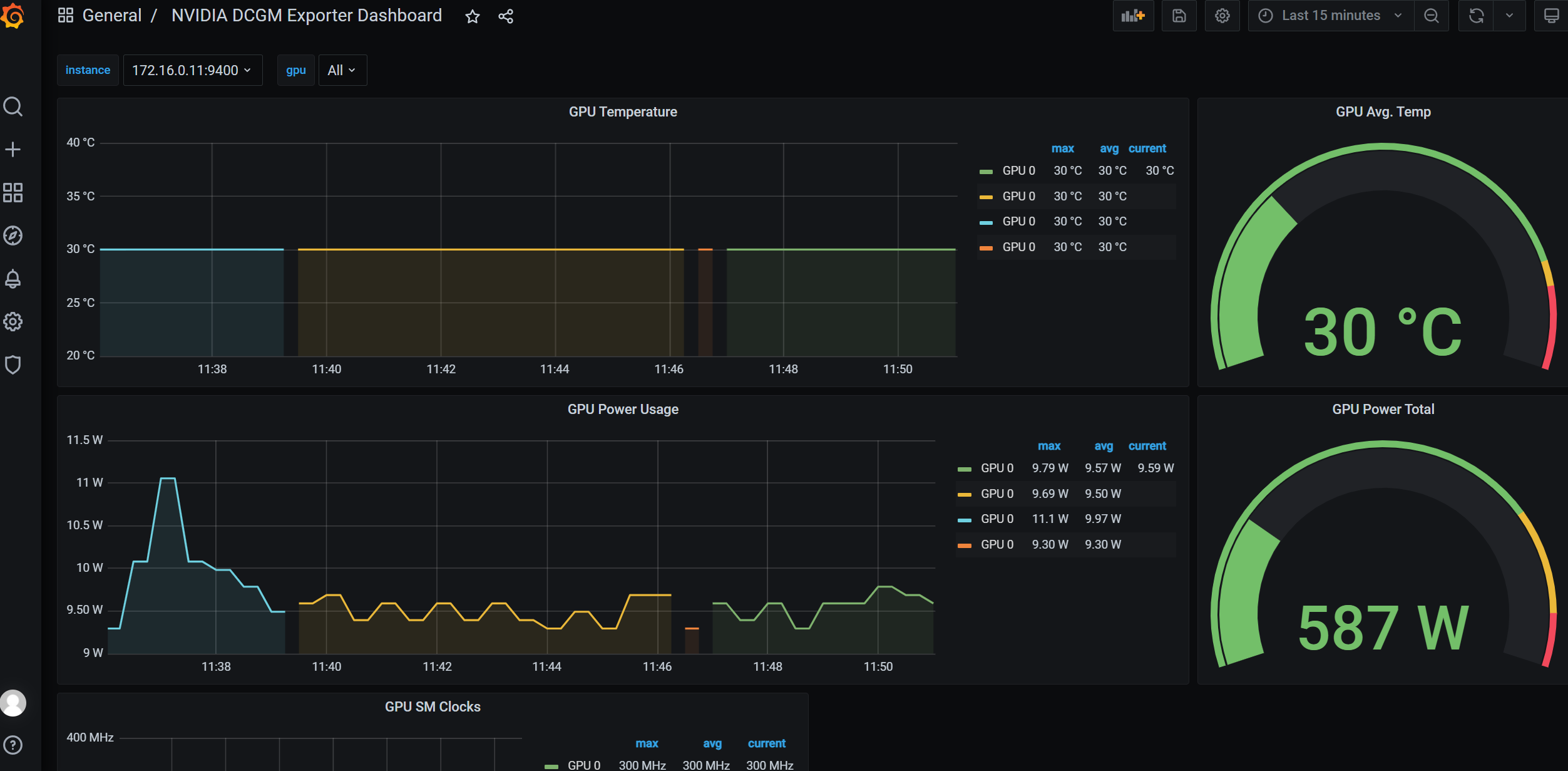
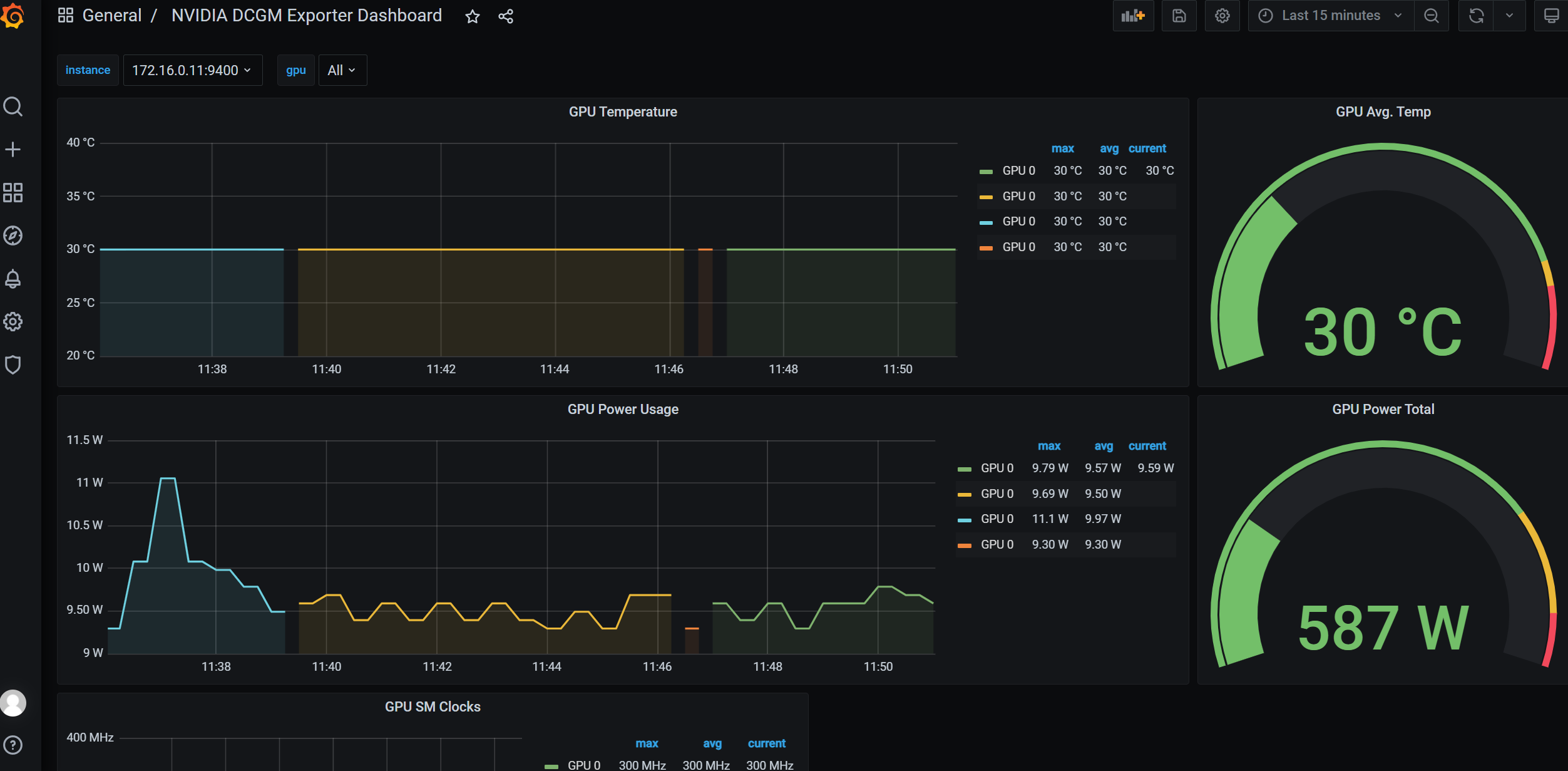
What you don't measure, you can't optimize. For GPUs, DCGM Exporter is the standard way to Prometheus/Grafana – including MIG awareness.
apiVersion: apps/v1
kind: DaemonSet
metadata:
  name: dcgm-exporter
spec:
  template:
    spec:
      containers:
      - name: dcgm-exporter
        image: nvcr.io/nvidia/k8s/dcgm-exporter:3.0.0
        env:
        - name: DCGM_EXPORTER_KUBERNETES_GPU_ID_TYPE
          value: "mig-uuid"
What to Monitor?
- GPU Utilization (SM, Tensor Cores), Memory Utilization, Memory BW.
- Per-Pod/Per-Tenant usage rates (chargeback/showback).
- Thermals/Power, ECC, Retired Pages (hardware health).
- Scheduling KPIs: Pending times, failed placements, preemption.
Target Image: A clear cost/utilization dashboard per namespace/team, tracked weekly. Utilization < 40%? Adjust profiles (coarser/finer), tune autoscaling, bundle training windows.
Developer Experience: Self-Service Without Surprises
Developers want to simply request what they need – without tickets, without tribal knowledge.
Requesting Resources – Unified Interface
- MIG Pods:
limits: { nvidia.com/mig-<profile>: 1 } - Time-Slicing Pods:
limits: { nvidia.com/gpu: 1 }(shared via ConfigMap) - Full GPU:
limits: { nvidia.com/gpu: 1 }ongpu-type=h100-full
Images & Toolchains
- Standardized base images (
nvcr.io/nvidia/cuda:<version>), plus PyTorch/TensorFlow variants. - Build pipelines (Kaniko/BuildKit) with targeted CUDNN/CUDA versions per workload.
- Repro data: Models, tokenizer, weights as OCI artifacts or via model registry with immutable tags.
Accelerating Dev Loops
- Time-Slicing for notebooks (Jupyter, VS Code Remote). More concurrent sessions per GPU, acceptable latency.
- MIG slices for dedicated test/benchmark runs (stable, reproducible).
- Feature gates via Helm values – team independently switches between TS/MIG/Full (naturally only on suitable nodes).
Operational Processes: GitOps Flow for GPU Infrastructure
- MIG layouts as YAML/TOML in the Git repo (per node group).
- Device plugin DaemonSet with MIG_STRATEGY/Time-Slicing config versioned.
- Node labels/taints declaratively via Cluster API/Ansible/Terraform.
- Quotas/LimitRanges per namespace, RoleBindings for self-service.
- Dashboards/alerts as code (Grafana/Alertmanager as code).
Change Management
- MIG layout changes are disruptive (re-partitioning of GPUs). Plan as maintenance window with workload eviction and drain.
- Device plugin versions staged rollout (canary node pool).
- Policy as code (OPA/Gatekeeper): Enforces correct resource requests, prevents "nvidia.com/gpu: 7" in wrong pools.
Performance Tuning & Pitfalls
GPU workloads in Kubernetes are powerful but sensitive to architectural details. To get the most out of an H100 fleet, you need to know and consciously adjust some levers.
1) NUMA & Topology
In servers with multiple CPU sockets, GPUs are connected to specific NUMA nodes. If a Pod lands on the "wrong" NUMA node, additional PCIe hops occur, significantly degrading performance. For LLM inference, this is often still acceptable, but not for HPC or training jobs with high IO rates. Solution: Topology-aware scheduling.