Kubernetes 1.31 has completed the largest migration in Kubernetes history by removing the in-tree cloud provider. Although the migration of components is now complete, it introduces additional complexity for users and installation projects like kOps or Cluster API. In this article, we explore the additional steps and potential pitfalls, providing recommendations for cluster owners. This migration was complex and required extracting some logic from core components, leading to the formation of four new subsystems.
- Cloud Controller Manager ([KEP-2392][kep2392])
- API Server Network Proxy ([KEP-1281][kep1281])
- Kubelet Credential Provider Plugins ([KEP-2133][kep2133])
- Storage migration to use [CSI][csi] ([KEP-625][kep625])
The [Cloud Controller Manager is part of the control plane][ccm]. It is a critical component that replaces some functions previously existing in the kube-controller-manager and kubelet.
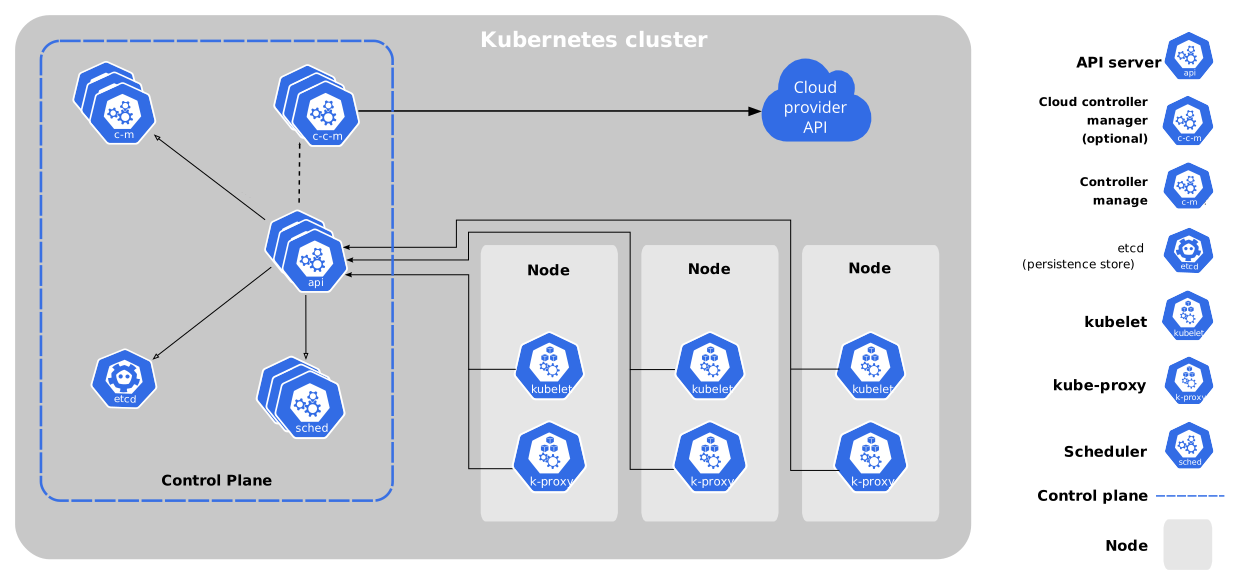
One of the key functions of the Cloud Controller Manager is the Node Controller, responsible for the initialization of nodes.
As seen in the diagram below, the kubelet registers the node object with the API server and applies a taint to the node so that it can be processed first by the Cloud Controller Manager. However, the initial node object lacks specific cloud provider information, such as node addresses and labels with cloud-specific information like node, region, and instance type.

This new initialization process adds some delay to node readiness. Previously, the kubelet could initialize the node simultaneously with its creation. Since the logic has now been moved to the Cloud Controller Manager, this can lead to a [chicken-and-egg problem][chicken-and-egg] during cluster bootstrapping, especially in Kubernetes architectures that do not deploy the Controller Manager along with other control plane components, often as static pods, standalone binaries, or DaemonSets/Deployments with tolerations for the taints and using hostNetwork (more on this below).
Examples of the Dependency Problem
As mentioned above, during bootstrapping, the Cloud Controller Manager might not be scheduled, leading to improper cluster initialization. Below are some concrete examples of how this problem can manifest and the underlying causes of why this might happen.
These examples assume you are running your Cloud Controller Manager via a Kubernetes resource (e.g., Deployment, DaemonSet, or similar) to manage its lifecycle. Since these methods rely on Kubernetes to schedule the Cloud Controller Manager, care must be taken to ensure it is scheduled properly.
With ayedo as a partner for Kubernetes, you can ensure your cluster is efficiently and optimally configured to tackle such challenges.
Source: Kubernetes Blog